
Listing Photo Privacy: What Sellers Should Remove or Hide
On this page
Quick answer
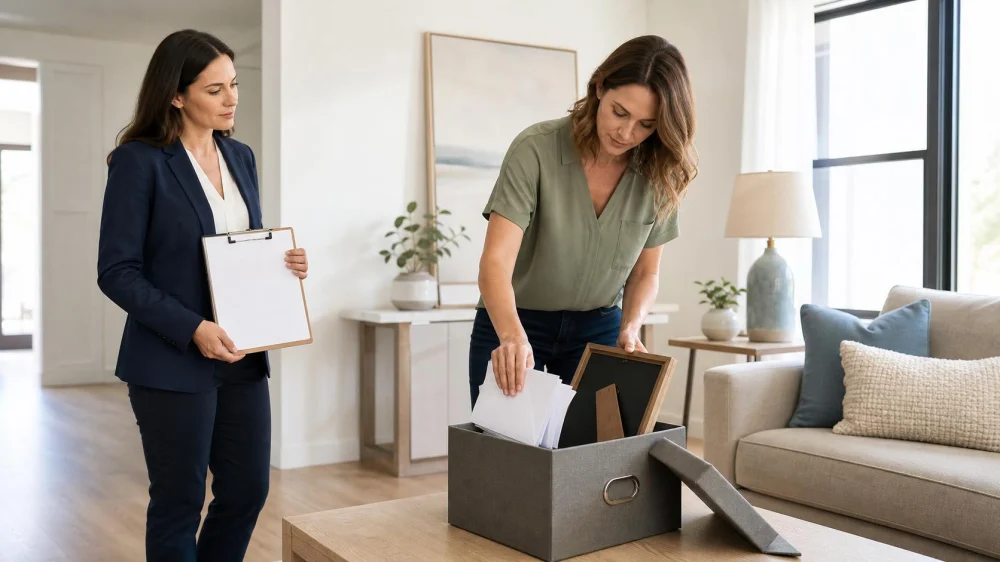
Before listing photos or video are captured, remove anything that reveals identity, routines, access information, finances, health details, or account credentials. Check mail, calendars, family photos, diplomas, medicine labels, keys, computer screens, smart displays, and paperwork. Lock up valuables and sensitive records rather than placing them in a nearby drawer. Then review every image with your listing professional before publication.
This guide is for U.S. home sellers preparing for photography, video, virtual tours, floor-plan scans, or showings. It offers a practical privacy check, not legal, cybersecurity, insurance, or real estate advice. Listing distribution and removal practices vary among brokers, multiple listing services, portals, and contracts.

West 130 / 130 west hempstead apartments
West HempsteadNassau CountyNew York
130 Hempstead Ave, West Hempstead, NY 11552, USA
Why photo privacy matters
Listing photo privacy is the practice of limiting personal or security-relevant details visible in marketing images while presenting the property accurately. A listing image may be copied, enlarged, shared, cached, or remain online after the property is sold. A detail that seems unreadable from across a room may become clearer in a high-resolution close-up.
Privacy preparation is different from hiding a property condition. Removing a prescription label or family calendar protects personal information; editing out damage, a permanent feature, or a material condition can misrepresent the home. Ask your listing professional how marketing rules and seller disclosure duties apply in your location.
Think beyond the photographer’s camera. Buyers, inspectors, appraisers, contractors, and other authorized visitors may carry phones or capture images for legitimate transaction purposes. A repeatable security plan should cover both marketing day and later access.

90W Luxury Apartments / 90w nyc
New YorkNew York CountyNew York
90 Washington St, New York, NY 10006, USA
Remove identifying details
Start with surfaces that naturally appear in wide-angle photos: kitchen counters, desks, nightstands, refrigerator doors, entry tables, bathroom vanities, bulletin boards, and open shelving.
Remove or fully conceal:
- mail, shipping labels, school notices, and appointment cards;
- calendars that show names, travel dates, work shifts, or regular routines;
- family photographs and children’s names, school names, uniforms, or activity schedules;
- diplomas, awards, employee badges, and certificates with identifiable details;
- checks, bank or tax records, bills, insurance documents, and mortgage papers;
- passports, Social Security cards, identification cards, legal papers, and medical records;
- Wi-Fi passwords, alarm instructions, gate codes, lockbox information, and written login credentials; and
- travel tickets, vehicle documents, membership cards, and pet tags with contact information.
Do not depend on turning a page face down or blurring one item later. Move it to secure storage before photography. Check reflective surfaces as well; mirrors, glossy appliances, and framed glass can reveal a screen, document, person, or area outside the intended frame.
Secure sensitive and valuable items
A drawer, bedroom closet, decorative box, or kitchen cabinet may keep an item out of a photograph but is not secure during showings. Use locked storage in an appropriate location, move items off-site, or follow professional storage guidance.
Secure items may include:
- jewelry, cash, collectible items, and small electronics;
- prescription medicines and containers bearing patient information;
- spare house, vehicle, mailbox, storage, and office keys;
- financial, legal, identity, health, and property records;
- laptops, backup drives, paper address books, and authentication devices; and
- firearms or other regulated items, stored according to applicable law and qualified safety guidance.
Keep records that you are required to retain; privacy preparation does not mean throwing them away. The Federal Trade Commission advises locking up important personal documents and securely shredding records only when it is appropriate to dispose of them. Do not place sensitive papers in household trash merely to clear a room.
Maintain a simple inventory of valuable items removed from the property and where you stored them. Do not put that inventory where visitors or photos can reveal it.
Check screens and smart-home devices
Digital displays can reveal more than paper. Before the photo session, lock or power down computers and tablets, clear television notifications, and place phones out of view. Do not leave a work dashboard, family photo slideshow, video-call screen, camera feed, email preview, or account name visible.
Review smart displays, voice assistants, thermostats, security panels, video doorbells, digital photo frames, and connected appliances. Use owner-approved settings to prevent personal photos or notifications from appearing during the session. Do not disable a required life-safety or security function without understanding the consequences.
Ask the photographer whether a 3D camera, floor-plan service, drone, or virtual-tour platform will capture more than standard still photos. Confirm which rooms, closets, storage areas, exterior views, and outbuildings are included. If a room must be excluded for a legitimate privacy or safety reason, agree on that scope before capture and ensure the listing remains accurate.
Do a room-by-room photo test
Walk through the home with a phone camera before the professional arrives. Stand where a photographer is likely to stand: room corners, doorways, the foot of a bed, the kitchen island, and exterior approach points. Take test images without publishing them, then zoom in and inspect the background.
- Entry and exterior: remove spare keys, access codes, vehicle documents, package labels, and personal notices.
- Living areas: check framed photos, calendars, mail, device screens, and reflections.
- Kitchen: clear refrigerator notes, prescription deliveries, bills, and smart-display notifications.
- Bedrooms: secure jewelry, medicine, identity documents, work materials, and children’s information.
- Bathrooms: remove prescription labels, pharmacy receipts, medical products with names, and sensitive personal items.
- Office: lock records and devices; remove whiteboard notes, account details, client information, and badges.
- Garage and utility areas: secure keys, documents, labeled storage, license details, and access controls.
Repeat the test at the time of day scheduled for photography. Sunlight, interior lighting, and open blinds can change reflections and reveal neighboring property or interior details that were not obvious earlier.
Review the published listing
Ask your listing professional how and when you can review the selected images, captions, video, floor plan, virtual tour, and property description. Look at full-screen versions, not only thumbnails. Confirm that personal information is not visible and that the images accurately represent the property.
If you find a privacy problem, contact the listing professional promptly with the exact image and issue. Ask which systems received the media, whether the source image can be replaced or removed, and what copies may persist on third-party websites. Do not assume deleting one upload instantly removes every syndicated or cached copy.
Discuss in advance what happens to the media after the listing expires, is withdrawn, or closes. Photo ownership, licensing, MLS rules, portal display, and record-retention practices can differ. If the handling of images is important to you, review the relevant agreement and seek qualified legal advice before signing.
Limits and important notes
- Removing personal items reduces exposure but cannot guarantee privacy or prevent every unauthorized photo.
- Do not hide defects or change permanent property features in a way that could mislead buyers.
- Do not share alarm, gate, smart-lock, or lockbox codes through an unverified message.
- Ask your agent about controlled access, visitor instructions, photography policies, and how to report a concern.
- Keep insurance, legal, tax, and transaction records for the appropriate period; secure storage and proper disposal are separate decisions.
If personal information has already been exposed or you suspect identity theft, follow current guidance from the relevant account provider and the Federal Trade Commission. For a security incident involving the home, contact the appropriate local authority or emergency service.
Sources and evidence notes
The checklist reflects current consumer guidance from the National Association of REALTORS® on putting away family photos, calendars, mail, credentials, passwords, sensitive documents, valuables, and prescription medicines before a home is marketed or shown. FTC guidance supports locking up important documents and securely disposing of personal records only when retention is no longer needed.
- National Association of REALTORS®: Home Selling Tips for Privacy and Safety
- Federal Trade Commission: Protecting Personal Information and Documents
These sources provide broad national practices. Your listing agreement, local law, MLS rules, insurance requirements, and professional advice may add other obligations.
Frequently asked questions
Should sellers remove every family photo?
Removing visible family photos is the safer privacy choice, especially when images identify children, schools, workplaces, routines, or relatives. Store originals securely rather than placing them in an accessible closet.
Can the photographer blur a document instead?
Do not rely on later editing when you can remove the item before capture. A source file, outtake, reflection, or video frame could still contain the detail. If editing is necessary, confirm who performs it and review the final media.
Where should prescription medicine go?
Use secure storage appropriate for the medication and household, or move it according to pharmacist or manufacturer instructions. Do not expose labels, leave medicine in an unlocked drawer, or change required storage conditions merely for staging.
Should I turn off security cameras during photos or showings?
Discuss device settings, recording, audio, notice, and local law with your listing professional and a qualified attorney when needed. Do not disable safety systems or conceal recording practices without understanding the rules.
Can listing photos stay online after the sale?
They may remain on brokerage, MLS, portal, archive, or third-party systems depending on agreements and policies. Ask before listing how media is distributed, licensed, updated, and handled after closing.
Next steps
Schedule a privacy walk-through before the photographer arrives. Remove identifying details from every visible surface, lock up sensitive and valuable items, secure devices, and test each room with a camera. Review all final media at full size with your listing professional and report any exposed information immediately.






 Donna Demkowicz Real Estate Co4.0 (102 reviews)
 RELI (Real Estate Long Island)5.0 (84 reviews)
 Daniel Gale Sotheby’s International Realty - Carle Place, NY0.0 (0 reviews)
 Giovanni Mallozzi Real Estate Broker3.0 (2 reviews)
 The Bellslip4.0 (56 reviews)
 2 Gansevoort5.0 (1 reviews)
 How to Navigate Real Estate Contracts: A Comprehensive Guide
 How Technology Is Changing the Real Estate Industry
 Understanding the Different Types of Mortgages
 Buyer Agency Agreement: What to Review Before Signing
 Tips for Relocating to a New State Successfully: A Step-by-Step Guide
 Final Walkthrough Checklist Before Home Closing