
Check Internet and Cell Service Before Buying a Home
On this page
Quick answer
Do not assume an address has suitable internet or cellular service because nearby homes do. Search the exact location on the FCC National Broadband Map, confirm service directly with providers, inspect existing wiring, and test your own phone in multiple rooms. Compare upload speed, data limits, equipment, installation timing, and backup options before an offer becomes difficult to change.

Start with your actual needs
“High-speed internet” is not a complete requirement. List what the household must do at the same time: video meetings, cloud backups, gaming, streaming, security cameras, remote learning, telehealth, or running a business. Note how many people and devices may be active.
Remote workers should pay particular attention to upload performance, latency, stability, and employer security requirements. A fast advertised download speed may not solve poor video-call quality or slow file uploads. Decide which activities are essential and which are simply preferred.

Avalon Brooklyn Bay / avalon brooklyn bay
1501 Voorhies Ave, Brooklyn, NY 11235, USA
Verify fixed internet at the address
- Search the exact street address on the FCC National Broadband Map.
- Record the providers, connection technologies, and maximum advertised download and upload speeds shown.
- Contact each promising provider and ask it to verify serviceability for the exact unit, not only the ZIP code.
- Ask whether service is active now, requires construction, has a waitlist, or depends on equipment availability.
- Request the plan details and installation estimate in writing when possible.
The FCC map displays availability reported by providers. It is a useful screening source, but it does not guarantee real-world performance, price, an installation date, or indoor Wi-Fi quality. If information appears wrong, the map provides a process for an availability or location challenge.
For an apartment or condominium, verify the exact unit and building. A provider may serve the property while limitations in internal wiring, owner agreements, or equipment placement affect a particular unit.
Test mobile service inside and outside
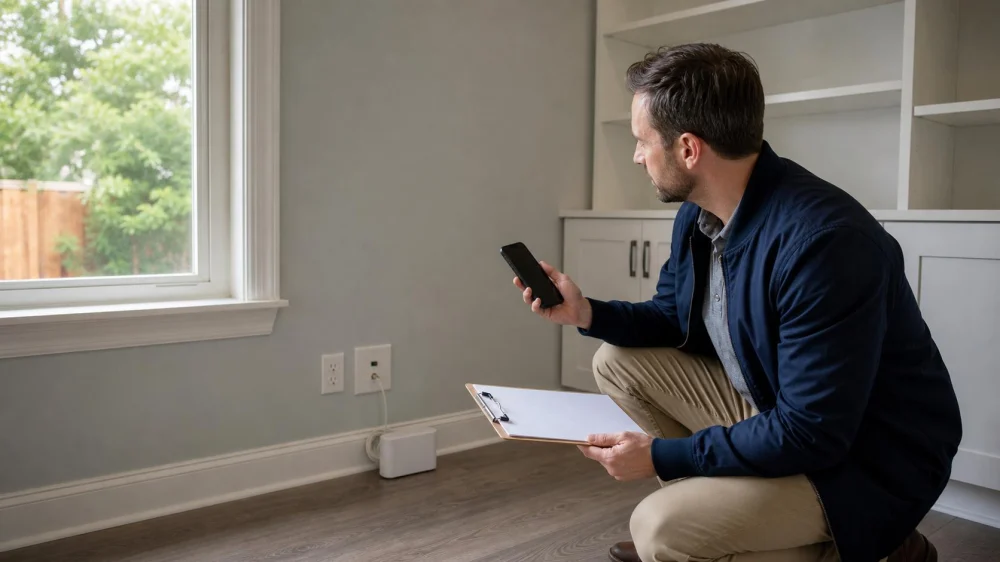
Coverage maps are predictions, and indoor experience can differ. During a permitted showing, check your own phone at the front door, main living space, bedrooms, home office location, basement, yard, and garage. Note signal behavior rather than relying only on the number of bars.
- Place a normal voice call and listen for dropped audio.
- Load a webpage with Wi-Fi turned off.
- Check whether the phone stays on 5G or LTE or repeatedly changes networks.
- Repeat the test for every carrier the household depends on.
- Ask whether Wi-Fi calling works with the planned internet service and devices.
Do not make intrusive calls, run heavy tests on someone else’s network, or enter private areas without permission. If coverage is essential, arrange a longer second visit and test at a busy time when possible.
Inspect installation details
Look for the service entry point, modem or optical network terminal, coaxial or Ethernet outlets, structured wiring panel, and practical router locations. Thick masonry, metal, mirrors, large appliances, multiple floors, and long distances can weaken indoor Wi-Fi even when the incoming connection is strong.
Ask the seller what equipment belongs to a provider and what will remain. Existing wall plates do not prove that a line is active. For rural or fixed-wireless service, trees, terrain, roof access, and line of sight may matter. Satellite service may need a clear view of the sky and an acceptable equipment location.
If new cabling, trenching, roof mounting, or electrical work may be required, obtain professional input and verify permissions. Condominium or homeowners association rules and local requirements may restrict exterior equipment.
Compare plans and costs
Compare the complete offer, not just a promotional monthly number:
- Download and upload speeds
- Typical performance disclosures where provided
- Data caps, overage rules, or priority-data limits
- Equipment rental or purchase
- Installation, activation, and construction charges
- Contract term, early termination terms, and promotional expiration
- Taxes and other recurring fees
- Repair support and estimated installation date
Provider broadband labels can help organize these details, but availability and pricing may change. Save the date and source of each quote. Do not treat a seller’s current bill as a promise that a new customer will receive the same plan.
Plan for reliability and backup
If connectivity supports income, education, medical access, or home safety, consider how the household would function during an outage. A mobile hotspot may be a useful backup only if the carrier works reliably at the property and the plan permits enough data. A second fixed connection may be possible, but two brands can sometimes use the same underlying infrastructure.
Ask neighbors general questions about outages and repair response without requesting account details. Their experience is useful context, not proof of future service. Power outages can also disable modems, routers, towers, and some network equipment, so clarify what backup power would and would not cover.
Buyer checklist
- Define required applications, users, and backup needs.
- Search the exact address on the FCC map.
- Confirm serviceability with at least one suitable provider.
- Record technology, upload/download speeds, caps, fees, and install timing.
- Test each household carrier in priority rooms.
- Inspect wiring, service entry, and router placement options.
- Estimate any cabling, mesh Wi-Fi, mounting, or construction work.
- Resolve association, landlord, permit, or access restrictions.
- Keep written evidence with the property comparison notes.
Limitations and important notes
A map, provider lookup, seller statement, or single speed test cannot guarantee future performance. Networks change, congestion varies, devices differ, and service may be interrupted. The FCC mobile map is based on standardized modeled outdoor or in-vehicle coverage and does not represent indoor coverage at every home.
Contract, disclosure, and contingency options vary by state and transaction. Discuss property-specific protections with a licensed local real estate professional or attorney. This guide supports due diligence; it is not a service guarantee, technical site survey, or legal opinion.
Evidence notes
The FCC’s National Broadband Map instructions explain how to search an address, view providers and technologies, compare fixed and mobile availability, and challenge incorrect information. FCC documentation also notes that the map shows provider-reported availability rather than performance or affordability.
The FCC explains that its mobile coverage layer is modeled for outdoor stationary or in-vehicle use and that actual experience may vary with the device, terrain, and network conditions. That is why address research and on-site testing serve different purposes.
Frequently asked questions
Does “fiber available nearby” mean the home can get fiber?
No. A provider must confirm the exact serviceable address or unit. A line on the street may not mean the property can be connected on the desired timeline or without added work.
Can the seller run a speed test for me?
It can provide useful context if the result includes the date, connection type, plan, device, and whether the test used Wi-Fi or Ethernet. It still does not guarantee the buyer’s future plan or performance.
Is a cellular coverage map enough?
No. Use maps for screening, then test the carriers and devices the household actually uses. Building materials and room location can make indoor service different from modeled outdoor coverage.
When should I verify service?
As early as possible, ideally before committing to terms that are difficult to change. Installation estimates and written provider confirmation are more useful than discovering a limitation shortly before moving.
Next steps
Turn connectivity into a documented property requirement. Check the exact address, call providers, test mobile service, inspect the physical setup, and compare total plan terms. If a suitable connection is essential, discuss how to address that need in the purchase process with a local professional before deadlines pass.






 Turnkey Office Space4.0 (13 reviews)
 eXp Realty - Forest Hills, Queens Branch Office2.0 (5 reviews)
 Real Estate By A D0.0 (0 reviews)
 BAYCHESTER REALTY AND BUSINESS CENTER2.0 (5 reviews)
 Fang Fang Realty Inc. 芳芳地產5.0 (8 reviews)
 Tri State Commercial Realty LLC4.0 (90 reviews)
 Understanding the Advantages of Multi-Family Properties | Luxen House Realty Hub
 Tips for Evaluating the Rental Potential of a Property
 How to Save Money During the Home Buying Process: Expert Tips and Strategies
 Why You Should Check Asphalt Driveway Cracks and Sealing
 How to Stage Your Home for a Quick Sale
 How to Spot a Good Investment Property Before Buying